Report an issue
Use this form when something in the Flotiq Panel is not working as expected. Your message goes directly to Support.
Open the issue form
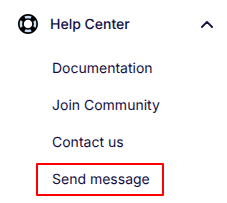
- In the Panel, go to
Help Center -> Send message. - The report issue window opens.
Fill in the form
Add the details below:
Message- explain:- what happened,
- what you expected to happen,
- how to repeat the issue (step by step).
Attachment(optional) - add files (PDF, PNG, or JPG), up to 10 MB.
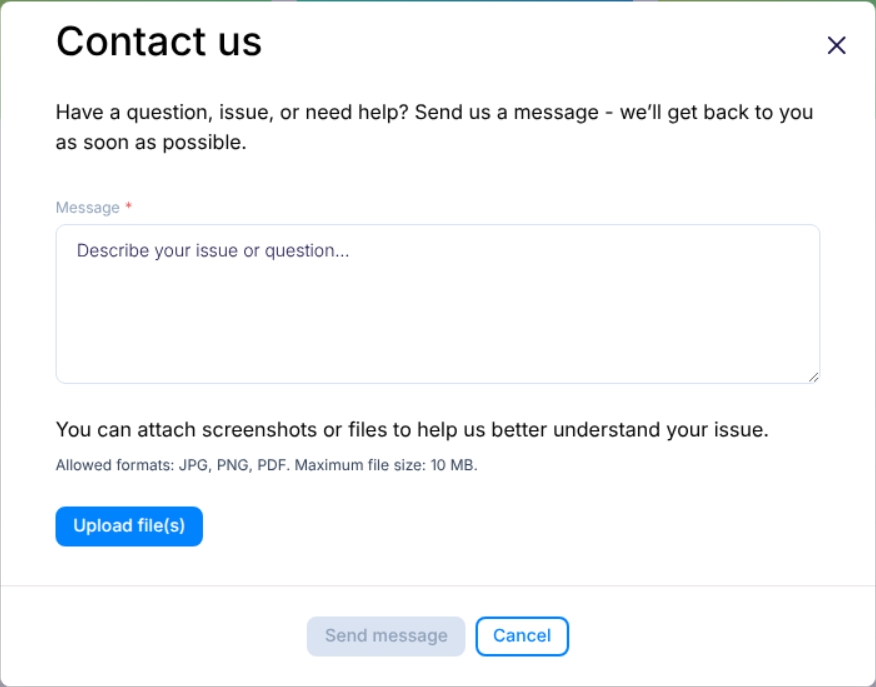
For faster help, include names of pages, content types, or objects related to the issue.
What happens after submission
- Your report is sent to Support by email.
- You get a status message in the Panel:
acceptedwhen the report is submitted,errorwhen submission fails.
If you see error, try again and include the same details.
Data added automatically
To help Support investigate faster, the system adds technical context automatically:
- user and organization identifiers,
- browser and operating system information,
- timestamp (date and time of submission).
Example information sent in the support email
Sender Information
Example values are shown below.
| Field | Value |
|---|---|
| Ticket Identifier | xdd9245475c90d93f0b39fce738ae1efd984ce0x |
| User ID | xxxxxxxx-xxxx-xxxx-xxxx-xxxxxxxxxxxx |
| Space ID | xxxxxxxx-xxxx-xxxx-xxxx-xxxxxxxxxxxx |
| Organization ID | xxxxxxxx-xxxx-xxxx-xxxx-xxxxxxxxxxxx |
| Issue created date | 2026-06-14 20:08:33 |
Metadata
{"userAgent":"Mozilla/5.0 (Macintosh; Intel Mac OS X 10_15_7) AppleWebKit/537.36 (KHTML, like Gecko) Chrome/149.0.0.0 Safari/537.36","platform":"macOS","screen":{"width":1710,"height":1107,"viewportWidth":1710,"viewportHeight":888,"pixelRatio":2},"locale":"en-US"}